
VLESS REALITY
REALITY borrows the TLS handshake of a real website, so the server needs no domain or certificate of its own; anyone without the key, active probes included, sees that real website. It is the protocol PSM recommends as your main line.
| Transport | TCP |
| Cores | Xray, sing-box, mihomo |
| Domain and certificate | not needed |
| Shared port 443 | yes (--mount-443) |
| Common clients | v2rayN, v2rayNG, Shadowrocket, Clash Verge Rev, sing-box |
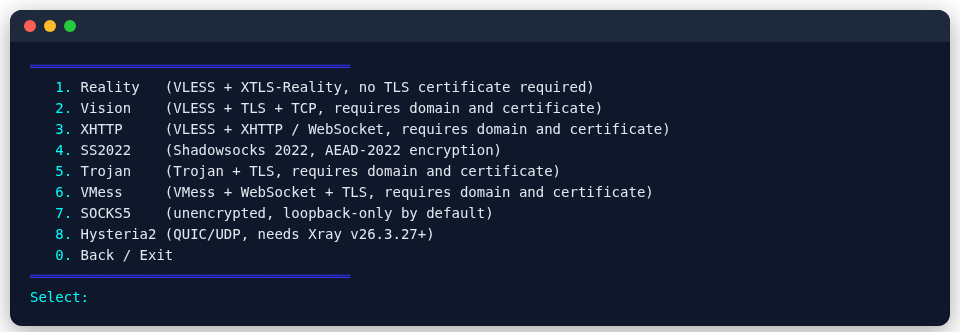
From the menu
- sing-box: main menu 2 → 4 → 1
- mihomo: main menu 3 → 4 → 1
- Xray: main menu 4 → 4 (Nodes) → 1 (Reality)
Enter the port and camouflage target when asked; the UUID, keys and short ID are generated for you.
From the command line
psm node add xray reality --tag my-reality --port 443 \
  --server-name learn.microsoft.com --dest learn.microsoft.com:443
For sing-box or mihomo, replace xray with sing-box or mihomo.
| Option | Meaning |
|---|---|
--port | listening port; 443 is recommended |
--server-name, --dest | the camouflage target's name and address; defaults are used when left out |
--mount-443 | put the node on Nginx's port 443 routing, next to other nodes |
--vless-enc x25519|mlkem768 | add VLESS Encryption on top (Xray; mlkem768 is post-quantum authentication, with a link of about 1.6 KB) |
--skip-dest-probe | skip the handshake test with the target (not recommended) |
Before creating the node, PSM performs a real handshake with the target through the node's own core. Some sites pass every TLS check and still cannot carry REALITY; a target that fails is not used.
Choosing the camouflage target
- Pick a real website that speaks TLS 1.3, not one behind Cloudflare or another CDN; otherwise anyone can reach the whole CDN through your server.
- Prefer a site in the same datacenter and network as the VPS, so latency and handshake look natural.
- When creating the node, PSM checks whether the target is a shared CDN front end; if so, it warns you and turns on fallback rate limiting. See Preventing traffic theft.
More in Choosing a protocol.
Export for clients
psm node export xray reality my-realityprints the vless:// link; 12 (View node links and QR codes) in the core menu also shows the QR code.

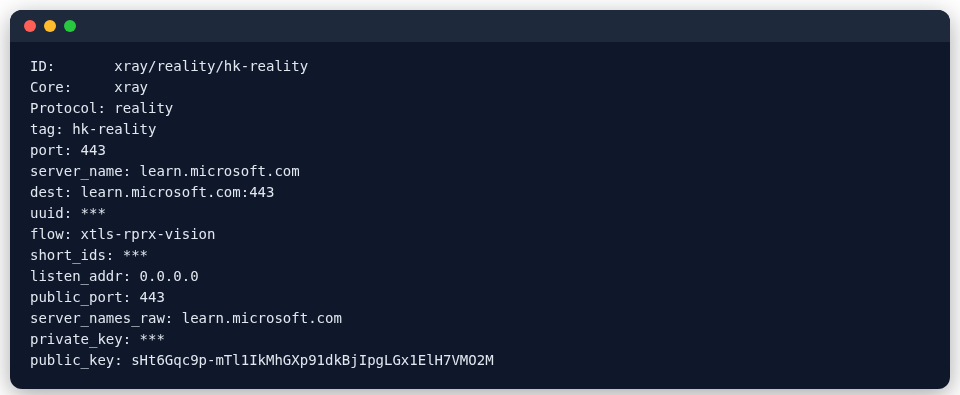
psm node show lists all of the node's settings (credentials hidden by default):
Common questions
- "REALITY: Listening on non-443 ports" in the log: ignore it for nodes on shared port 443; see the FAQ.
- It does not connect: run
psm doctorfirst, then try another camouflage target.