
Free residential exit
Many streaming and AI services check who owns an IP: datacenter IPs get blocked, home-broadband IPs get through. PSM can give your nodes a residential (home-broadband) exit for free, and send only the traffic that needs it that way.
Where it comes from
The exit comes from VPNGate, a public VPN relay project run by the University of Tsukuba in Japan, with nodes offered by volunteers around the world, so it costs nothing. From its public list, PSM:
- looks up who owns each IP and keeps only genuine home broadband, dropping datacenter IPs and VPNGate's own relays;
- connects to one of them with openvpn, as a tunnel used only for routed traffic;
- adds it as an exit in Xray, sing-box or mihomo, and routes services such as Netflix and ChatGPT through it by rule.
What you get
- You pick the country: the list shows only countries that actually have nodes, with how many each has.
- Automatic failover: with auto-rotate on, a failed node is replaced by another in the same country, so the exit country never drifts.
- No leaks through the datacenter IP: if the tunnel is down, traffic that matches the rules fails instead of going out through the datacenter IP.
- The server itself is untouched: the tunnel uses its own routing table, so the server's own traffic, SSH and other nodes are unaffected.
- Shared by all three cores: Xray, sing-box and mihomo use the same tunnel; switching residential nodes changes nothing in the core configs.
Turning it on
Want the residential line for one node only?
Per-node exit (WARP / residential) in the core's menu (sing-box: main menu 2 → 14, mihomo: 3 → 14, Xray: 4 → 13) sends only that node's chosen traffic into the residential tunnel, leaving every other node direct; from the command line it is psm node add … --exit vpngate --exit-sites streaming. See An exit for one node only. What follows sets up the server-wide residential exit.
In any core's menu (Xray, sing-box or mihomo) open Routing, then VPNGate residential-IP unlock exit (for sing-box and mihomo: main menu 2 or 3 → 5 → 11):
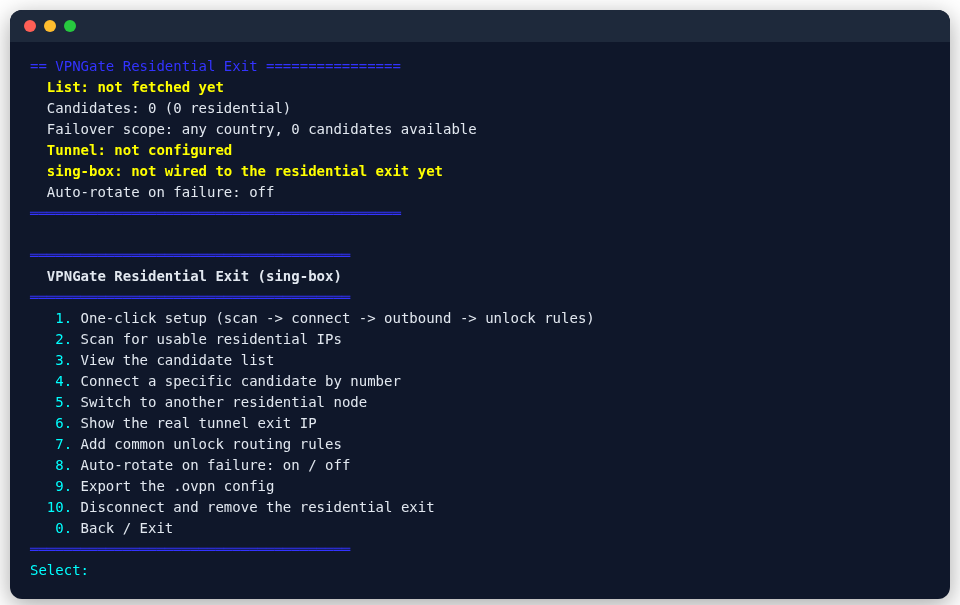
The first option does it all:
One-click setup (scan -> connect -> outbound -> unlock rules)
PSM scans for usable residential IPs, asks for the country, and once a connection works, writes the exit and adds common unlock rules. The other options:
| Option | What it does |
|---|---|
| Scan for usable residential IPs | fetch and filter the list again |
| View the candidate list | see which candidates there are |
| Connect a specific candidate by number | choose the node yourself |
| Switch to another residential node | move to another node (same country) |
| Show the real tunnel exit IP | confirm the exit IP in use |
| Add common unlock routing rules | add the usual Netflix, ChatGPT and similar rules |
| Auto-rotate on failure: on / off | check regularly and switch when a node drops |
| Export the .ovpn config | export the current node as an OpenVPN config |
| Disconnect and remove the residential exit | close the tunnel and remove the exit from the core configs |
To send more websites through it, route them to this exit under Routing, by domain or by rule set.
Good to know
- Nodes are run by volunteers, so speed and uptime are not guaranteed: use it for the few services that need it, not for all traffic.
- Traffic passes through a volunteer's machine: do not route sensitive traffic such as online banking through this exit.
- The streaming and AI unlock checkers in the System menu show whether it works.