
Traffic quotas and expiry
Per-node quotas
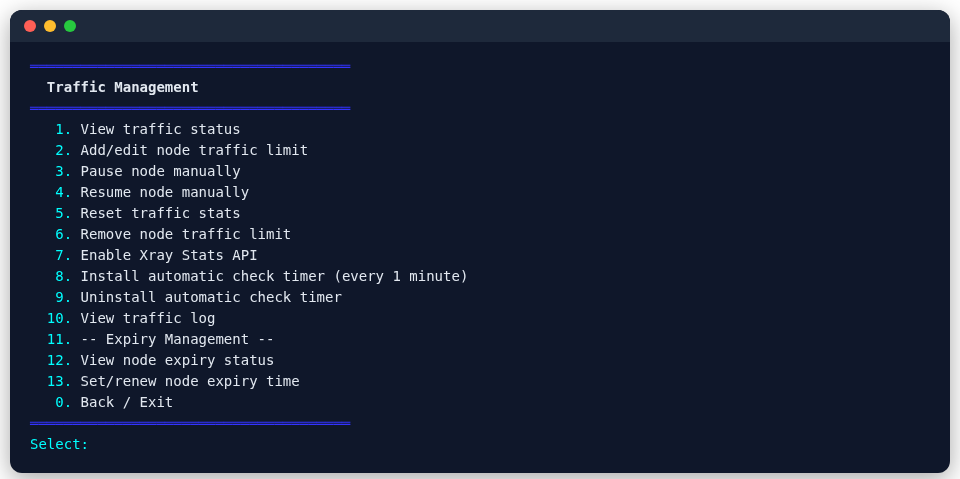
Set a monthly limit for a node in main menu 15 (Traffic):
- Covers every node on the three cores (Xray, sing-box, mihomo), plus the standalone Snell (its main user's port) and ss-rust (SS2022); counted every minute (choose Install the automatic check timer first).
- Xray nodes are counted through Xray's own stats API; sing-box and mihomo nodes and the standalone Snell and ss-rust through iptables per-port counters. Nodes on shared port 443 are counted on their backend port on the server, so they never mix with other nodes.
- One Telegram warning at 90%.
- The node pauses when the quota is used up, and resets and resumes on the monthly reset day (which you choose; at midnight in the server's time zone).
- Pause, resume and reset by hand at any time.
To limit a person rather than a node, use the --quota of per-user accounts (counts Xray nodes).
From the command line
psm traffic set NODE --limit-gb 100 --reset-day 1   # set a limit (0 meters without limiting)
psm traffic list                                    # usage, limits, paused or not
psm traffic reset NODE                              # back to zero, resumed
psm traffic unset NODE                              # stop metering it
The standalone Snell and ss-rust are snell and ss2022. The command line and the menu work on the same state. All options: CLI reference.
On PSM Panel
A server joined to PSM Panel reports every node's traffic to the panel: its traffic page shows this month's usage of every server and a daily chart, and a limit is set when creating or editing a node. Pausing and resetting are still done by the server itself.
Expiry dates
Give a node an expiry date, handy when you lend access for a while:
- Telegram reminders before and at expiry.
- The node pauses when it expires.
- One-step renewal.
Expiry dates are entered and shown in Hong Kong time (UTC+8), whatever the server's own time zone; the monthly reset day, the expiry of accounts and a relay's --expires follow the server's time zone.
Telegram notifications and bot
With the Telegram bot set up, you can check node traffic, handle renewals and get a daily health report (service status, quota warnings, expiry reminders, certificates, security state) without logging in to the server. Tenants can bind their own port and check their own usage. Setup: Telegram bot.