
Unlocking Netflix and ChatGPT
Many streaming and AI services block datacenter IPs. PSM sends only those services out through a different exit; everything else leaves the VPS directly, at full speed.
Exits
Cloudflare WARP — registers a WARP account in one step and adds it as an outbound. Xray, sing-box and mihomo share the same WARP account.
Free residential exit — genuine home-broadband IPs as an exit, so services that judge you by IP ownership see a residential IP. See Free residential exit.
Your own outbound — another node of yours (VLESS, Trojan, Shadowsocks, SOCKS5, …) can serve as an exit too.
Turning on WARP
- Open the core's menu → 5 (Routing) (sing-box: main menu 2 → 5, mihomo: 3 → 5, Xray: 4 → 5).
- Choose WARP unlock outbound (Netflix / OpenAI …): PSM registers a WARP account, writes the outbound, and adds routing rules as you choose.
- Choose Check WARP's actual exit IP to confirm the exit is now a Cloudflare IP.
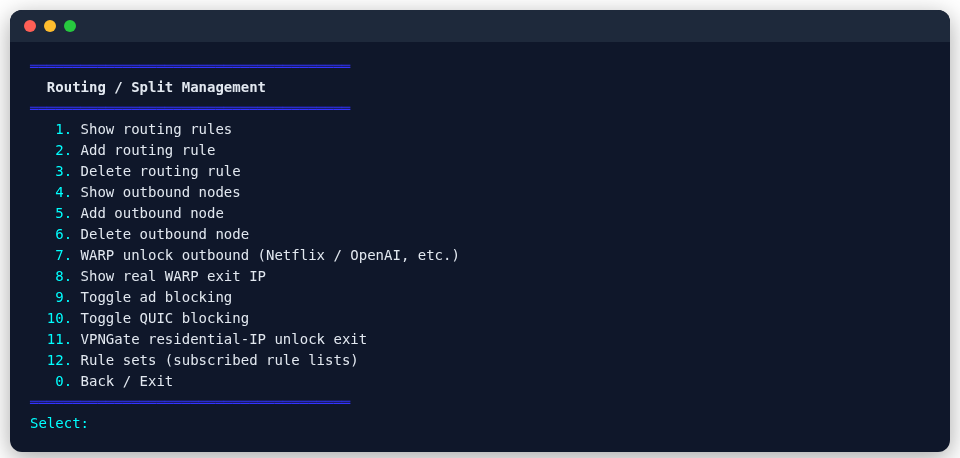
The same menu also has one-step ad blocking and QUIC blocking switches, and adds or removes custom outbounds.
An exit for one node only
The rules above belong to the whole server: traffic matching geosite:netflix takes the same exit whichever node it came in on. To give one node its own exit — unlocking AI on the node your family uses while your own download node stays direct — use Per-node exit (WARP / residential) in the core's menu:
- sing-box: main menu 2 → 14
- mihomo: main menu 3 → 14
- Xray: main menu 4 → 13
The entry lists that core's nodes, whatever their protocol, with the exit each one currently has. Pick a node, then its exit (none / WARP / free residential) and what goes through it (AI, streaming, both, all of that node's traffic, or a geosite list of your own). Choosing "no exit" clears an existing one.
The rule is tied to the node: changing the node rewrites it, deleting the node removes it, and the other nodes on the server are untouched.
The command line does the same thing, and so does the panel's exit field when you create a node:
psm node add sing-box hysteria2 --port 443 --exit warp --exit-sites ai
psm node update sing-box hysteria2 <tag> --exit none    # clear it
Routing by rule
Set rules under "Routing" in each core's menu:
- By domain, GeoSite or GeoIP, for example
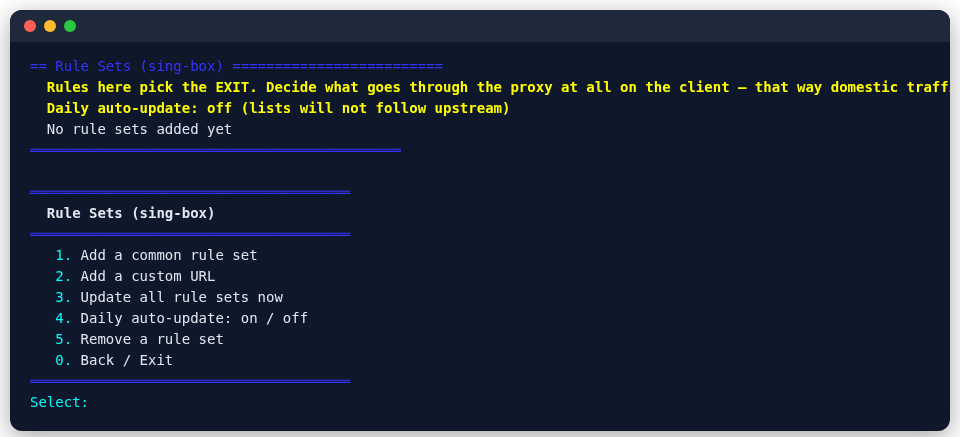
geosite:netflixthrough WARP. - Subscribed rule sets: paste the URL of a community rule list (such as OpenAI.list) and pick an exit; every domain in it goes that way. Rule sets refresh daily: sing-box and mihomo pick them up without a restart; Xray restarts only when the content actually changed.
- Before applying, PSM reports how many rules are usable, and names the client-only rule types it had to drop.
Rule sets are managed under Routing → Rule-set routing (subscribed rule lists): pick from common rule sets (the community-maintained blackmatrix7 lists) or paste your own URL; you can also update now, remove, and switch the daily update on or off.
Test first
The System menu has unlock checkers for streaming and AI services; run one before and after changing an exit to see the difference.